分类 Linux 下的文章

Apache Direcotry Indexes目录列表显示样式定制


<Directory>
Indexes 使目录内的文件或子目录以列表方式显示
Options Indexes

#This turns on fancy indexing of directories.
IndexOptions FancyIndexing

#果目录中含有HTML文件,则Apache会自动读取HTML文件的<title>......</title>部分
#用 HTML文件的标题作为Description(描述)显示在列表目录中的Description部分。。(注意:加载该指令会加大CPU的负荷!)
IndexOptions ScanHTMLTitles

#指定目录列表可以显示最长为25字节的文件/目录名,如果使用*来做值,会自适应到最长文件名
IndexOptions NameWidth=128

#指定目录列表可以显示最长为256字节的文件/目录描述内容
IndexOptions DescriptionWidth=256

#允许HTML格式
IndexOptions HTMLTable

#如果目录中含有同一文件的不同版本,则Apache会对该文件按照版本号自动排序
IndexOptions VersionSort

#最先列出文件夹会使显示效果
IndexOptions FoldersFirst

#忽略大小写
IndexOptions IgnoreCase

#默认显示字符集
IndexOptions Charset=GBK

#默认以文件或目录名升序排列
IndexOrderDefault Ascending Name

#给文件lua-5.1.3.tar.gz添加注释
    #AddDescription "Lua ... "     lua-5.1.3.tar.gz

#不显示apache版本及服务器信息
ServerSignature Off

AllowOverride None
Order allow,deny
Allow from all
</Directory>

Parrot(Kali)安装Tor并且代理戴套上网


1.下载并安装Tor

在Parrot中或Kali中直接用apt安装

apt-get update && apt-get install tor

2.下载并安装obfs4

apt-get install obfs4proxy

3.配置Tor Bridges

在Parrot中的配置文件:

SocksPort 9050
SocksListenAddress 127.0.0.1:9050  #为SOCKS代理地址
ClientOnly 1
#VirtualAddrNetwork 10.192.0.0/10
DNSPort 53
DNSListenAddress 127.0.0.1
AutomapHostsOnResolve 1
AutomapHostsSuffixes .onion,.exit
TransPort 9040
TransListenAddress 127.0.0.1
Log notice file /var/log/tor/notices.log
RunAsDaemon 1
ClientTransportPlugin obfs4 exec /usr/bin/obfs4proxy managed
UseBridges 1
Bridge obfs4 194.132.208.5:30581 7ED2B054B0E265BC10E3E277F4C0093455E87181 cert=Jm5OAs3DNqSsrsKBFAZzbaq/c7fq9M8+mxJXAO4ohUp0xFeImzxuEJmiT1mk0hAicTw0KA iat-mode=0
Bridge obfs4 155.94.238.154:443 F90B999AF1B4A0F5EEDA2E7E131A892609D7243D cert=NRCBE4aF9XCyRs3T5f8g5gzDV+Mj4oEFHx2prmSrz6vOni4H9BIxGSMIH6KK6H1SMATCEw iat-mode=0
Bridge obfs4 209.141.35.221:33965 A5BE53F078FC472002791D8C037D189EDEB6DE06 cert=jlzZIUA1z7ILTpUsgliL4ulissYmolqKxufObRQiObe0wPDYtPsDxuRrlr/r/QLwrgg+Vw iat-mode=0

其中网桥需要bridges@torproject.org发送邮件申请,其主题和内容为get transport obfs4,obfs4可换成其他类型网桥。

4.重启Tor

service tor restart

成功连接网桥之后可看到notices.log中有详细的信息:

Jun 18 23:02:15.000 [notice] Interrupt: exiting cleanly.
Jun 18 23:02:16.000 [notice] Tor 0.2.9.11 (git-572f4570e1771890) opening log file.
Jun 18 23:02:16.225 [warn] OpenSSL version from headers does not match the version we're running with. If you get weird crashes, that might be why. (Compiled with 1010006f: OpenSSL 1.1.0f  25 May 2017; running with 1010005f: OpenSSL 1.1.0e  16 Feb 2017).
Jun 18 23:02:16.242 [notice] Tor 0.2.9.11 (git-572f4570e1771890) running on Linux with Libevent 2.0.21-stable, OpenSSL 1.1.0e and Zlib 1.2.8.
Jun 18 23:02:16.242 [notice] Tor can't help you if you use it wrong! Learn how to be safe at https://www.torproject.org/download/download#warning
Jun 18 23:02:16.242 [notice] Read configuration file "/usr/share/tor/tor-service-defaults-torrc".
Jun 18 23:02:16.242 [notice] Read configuration file "/etc/tor/torrc".
Jun 18 23:02:16.245 [warn] The SocksListenAddress option is deprecated, and will most likely be removed in a future version of Tor. Use SocksPort instead. (If you think this is a mistake, please let us know!)
Jun 18 23:02:16.245 [warn] The DNSListenAddress option is deprecated, and will most likely be removed in a future version of Tor. Use DNSPort instead. (If you think this is a mistake, please let us know!)
Jun 18 23:02:16.245 [warn] The TransListenAddress option is deprecated, and will most likely be removed in a future version of Tor. Use TransPort instead. (If you think this is a mistake, please let us know!)
Jun 18 23:02:16.245 [notice] Opening Socks listener on 127.0.0.1:9050
Jun 18 23:02:16.245 [notice] Opening DNS listener on 127.0.0.1:53
Jun 18 23:02:16.245 [notice] Opening Transparent pf/netfilter listener on 127.0.0.1:9040
Jun 18 23:02:16.000 [notice] Parsing GEOIP IPv4 file /usr/share/tor/geoip.
Jun 18 23:02:16.000 [notice] Parsing GEOIP IPv6 file /usr/share/tor/geoip6.
Jun 18 23:02:16.000 [notice] Bootstrapped 0%: Starting
Jun 18 23:02:16.000 [notice] Delaying directory fetches: No running bridges
Jun 18 23:02:16.000 [notice] Signaled readiness to systemd
Jun 18 23:02:17.000 [notice] Opening Control listener on /var/run/tor/control
Jun 18 23:02:18.000 [notice] Bootstrapped 5%: Connecting to directory server
Jun 18 23:02:18.000 [notice] Bootstrapped 10%: Finishing handshake with directory server
Jun 18 23:02:19.000 [notice] Bootstrapped 15%: Establishing an encrypted directory connection
Jun 18 23:02:19.000 [notice] Bootstrapped 20%: Asking for networkstatus consensus
Jun 18 23:02:19.000 [notice] Bridge 'Unnamed' has both an IPv4 and an IPv6 address.  Will prefer using its IPv4 address (155.94.238.154:443) based on the configured Bridge address.
Jun 18 23:02:19.000 [notice] new bridge descriptor 'Unnamed' (fresh): $F90B999AF1B4A0F5EEDA2E7E131A892609D7243D~Unnamed at 155.94.238.154
Jun 18 23:02:19.000 [notice] I learned some more directory information, but not enough to build a circuit: We have no usable consensus.
Jun 18 23:02:21.000 [notice] Bootstrapped 25%: Loading networkstatus consensus
Jun 18 23:02:34.000 [notice] I learned some more directory information, but not enough to build a circuit: We have no usable consensus.
Jun 18 23:02:34.000 [notice] Bootstrapped 40%: Loading authority key certs
Jun 18 23:02:35.000 [notice] Bootstrapped 45%: Asking for relay descriptors
Jun 18 23:02:35.000 [notice] I learned some more directory information, but not enough to build a circuit: We need more microdescriptors: we have 0/7216, and can only build 0% of likely paths. (We have 0% of guards bw, 0% of midpoint bw, and 0% of exit bw = 0% of path bw.)
Jun 18 23:02:35.000 [notice] Bootstrapped 50%: Loading relay descriptors
Jun 18 23:03:52.000 [warn] Rejecting request for anonymous connection to private address [scrubbed] on a TransPort or NATDPort.  Possible loop in your NAT rules?
Jun 18 23:04:09.000 [notice] Bootstrapped 57%: Loading relay descriptors
Jun 18 23:04:09.000 [notice] Bootstrapped 64%: Loading relay descriptors
Jun 18 23:04:09.000 [notice] Bootstrapped 74%: Loading relay descriptors
Jun 18 23:04:09.000 [notice] Bootstrapped 80%: Connecting to the Tor network
Jun 18 23:04:10.000 [notice] Bootstrapped 90%: Establishing a Tor circuit
Jun 18 23:04:12.000 [notice] Tor has successfully opened a circuit. Looks like client functionality is working.
Jun 18 23:04:12.000 [notice] Bootstrapped 100%: Done
Jun 18 23:04:27.000 [warn] Proxy Client: unable to connect to 209.141.35.221:33965 ("general SOCKS server failure")
Jun 18 23:04:27.000 [warn] Proxy Client: unable to connect to 194.132.208.5:30581 ("general SOCKS server failure")
Jun 18 23:08:55.000 [warn] Rejecting request for anonymous connection to private address [scrubbed] on a TransPort or NATDPort.  Possible loop in your NAT rules? [337 similar message(s) suppressed in last 300 seconds]

其中的proxychains是默认有9050端口代理的,如果没有在/etc/proxychains.conf中添加:

socks4     127.0.0.1 9050

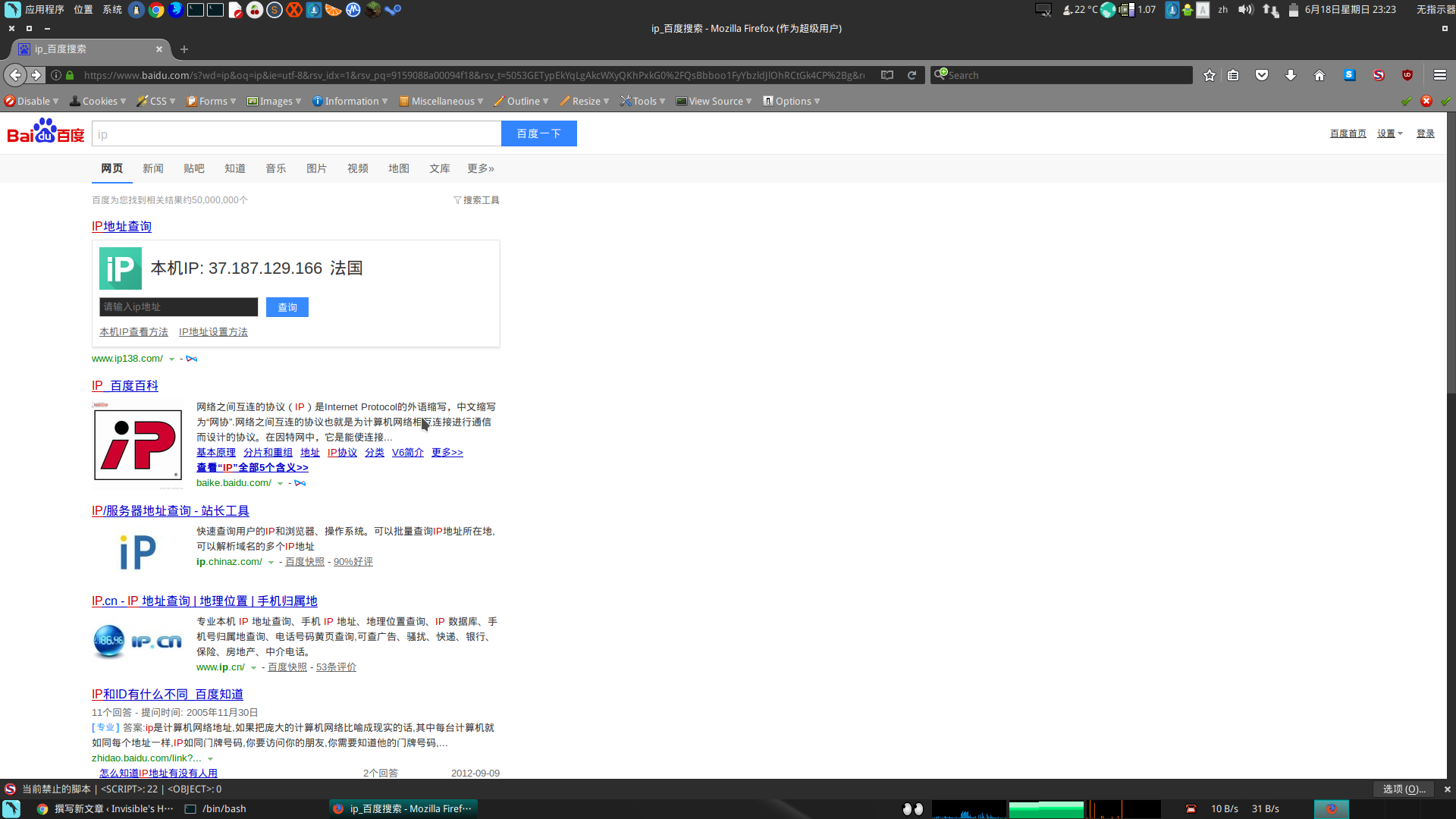
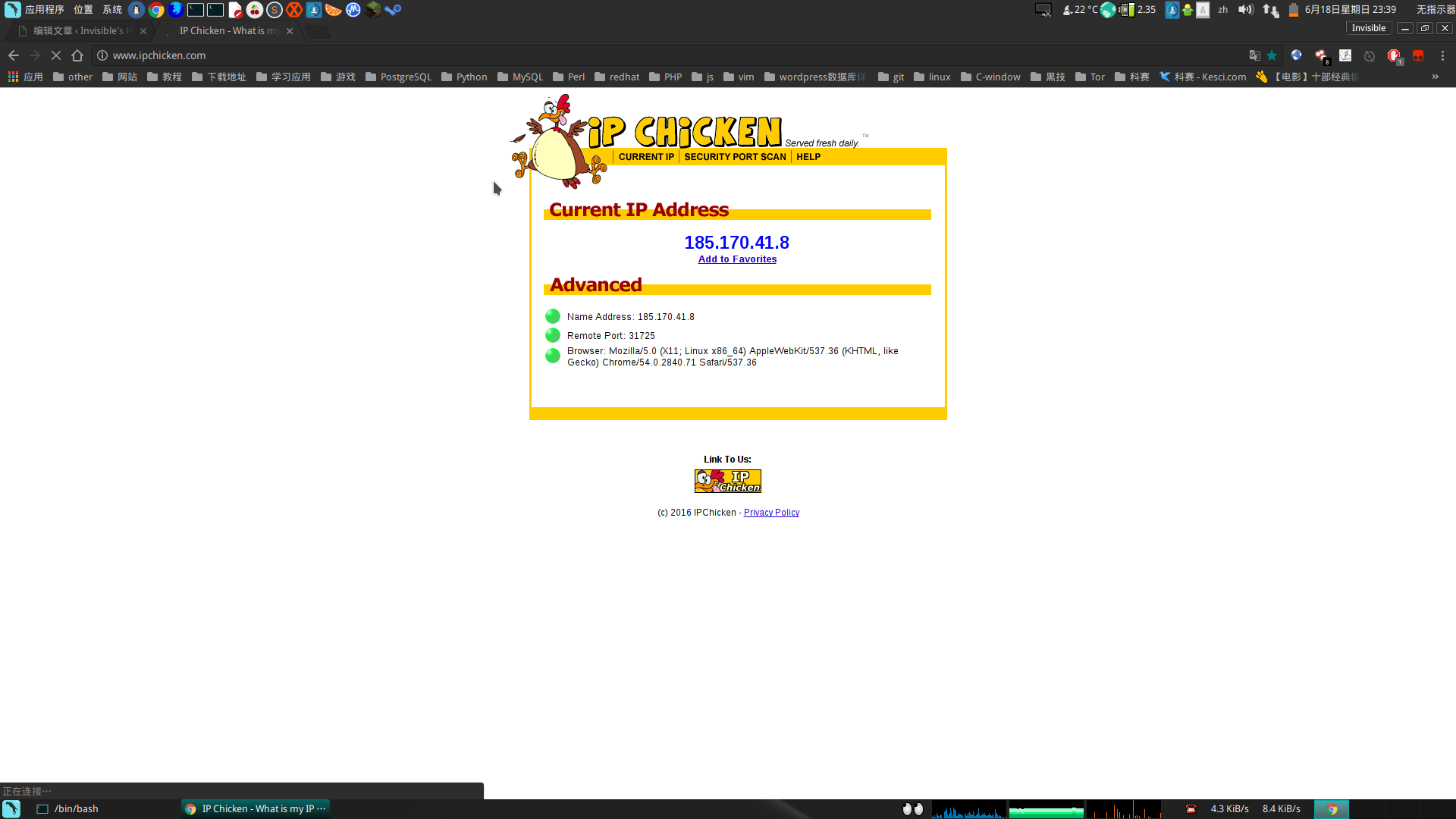
最后使用proxychains启动火狐浏览器,直接使用Tor代理上网,也可在Chrome中的SwitchySharp设置IP为127.0.0.1、端口为9050的SOCKS代理

proxychains fixefor

2017-06-18-23-23-37-创建的截图.png
2017-06-18-23-39-46-创建的截图.png


SSH隧道技术


何谓SSH隧道

隧道是一种把一种网络协议封装进另外一种网络协议进行传输的技术。这里我们研究ssh隧道,所以所有的网络通讯都是加密的。又被称作端口转发,因为ssh隧道通常会绑定一个本地端口,所有发向这个端口端口的数据包,都会被加密并透明地传输到远端系统。

SSH隧道的类型

ssh隧道有3种类型:

动态端口转发(Socks 代理)
本地端口转发
远端端口转发

动态端口转发

动态端口允许通过配置一个本地端口,把通过隧道到数据转发到远端的所有地址。本地的应用程序需要使用Socks协议与本地端口通讯。此时SSH充当Socks代理服务器的角色。

命令格式

ssh -D [bind_address:]port

参数说明

bind_address 指定绑定的IP地址,默认情况会绑定在本地的回环地址(即127.0.0.1),如果空值或者为*会绑定本地所有的IP地址,如果希望绑定的端口仅供本机使用,可以指定为localhost。
port 指定本地绑定的端口

使用场景

假设X网络(192.168.18.0/24)有主机A(192.168.18.100),Y网络(192.168.2.0/24)有主机B(192.168.2.100)和主机C(192.168.2.101),已知主机A可以连接主机B,但无法连接主机C。

在主机A执行

$ ssh -D localhost:8080 root@192.168.2.100

然后主机A上的应用程序就可以通过

SOCKS5 localhost:8080

访问主机C上的服务。

优点

配置一个代理服务就可以访问远端机器和与其所在子网络的所有服务

缺点

应用程序需要额外配置SOCKS代理,若应用程序不支持代理配置则无法使用

本地端口转发

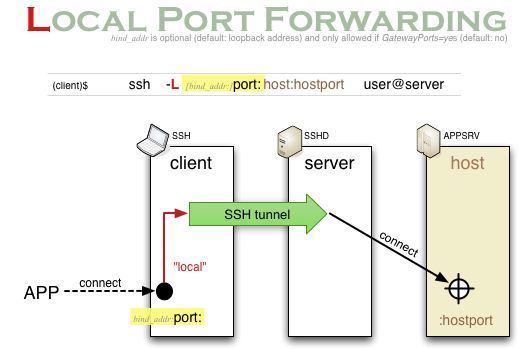
通过SSH隧道,将一个远端机器能够访问到的地址和端口,映射为一个本地的端口。
local_forwarding.jpg

命令格式

ssh -L [bind_address:]port:host:hostport

参数说明

bind_address 指定绑定的IP地址,默认情况会绑定在本地的回环地址(即127.0.0.1),如果空值或者为*会绑定本地所有的IP地址,如果希望绑定的端口仅供本机使用,可以指定为localhost。
port 指定本地绑定的端口
host 指定数据包转发目标地址的IP,如果目标主机和ssh server是同一台主机时该参数指定为localhost
host_port 指定数据包转发目标端口

使用场景

假设X网络(192.168.18.0/24)有主机A(192.168.18.100),Y网络(192.168.2.0/24)有主机B(192.168.2.100)和主机C(192.168.2.101),已知主机A可以连接主机B,但无法连接主机C。A主机需要访问C主机的VNC服务(5900端口)

在A主机上建立本地转发端口5901

$ ssh -L 5901:192.168.2.101:5900 root@192.168.2.100

然后本地vnc客户端通过5901端口打开c主机的vnc服务

$ open vnc://localhost:5901

优点

无需设置代理

缺点

每个服务都需要配置不同的端口转发

远端端口转发

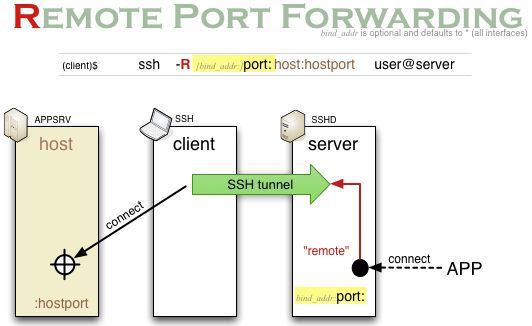
远程端口转发用于某些单向阻隔的内网环境,比如说NAT,网络防火墙。在NAT设备之后的内网主机可以直接访问公网主机,但外网主机却无法访问内网主机的服务。如果内网主机向外网主机建立一个远程转发端口,就可以让外网主机通过该端口访问该内网主机的服务。可以把这个内网主机理解为“内应”和“开门者”。
remote_forwarding.jpg

命令格式

ssh -R [bind_address:]port:host:hostport

参数说明

bind_address 指定绑定的IP地址,默认情况会绑定在本地的回环地址(即127.0.0.1),如果空值或者为*会绑定本地所有的IP地址,如果希望绑定的端口仅供本机使用,可以指定为localhost。
port 指定本地绑定的端口
host 指定数据包转发源地址的IP,如果源主机和ssh server是同一台主机时该参数指定为localhost
host_port 指定数据包转发源端口

使用场景

假设X网络(192.168.18.0/24)有主机A(192.168.18.100),Y网络(192.168.2.0/24)有主机B(192.168.2.100)和主机C(192.168.2.101),已知主机A可以通过SSH访问登录B主机,但反向直接连接被禁止,主机B和主机C可以相互访问。若主机C想访问主机A的VNC服务(5900端口)。

在主机A执行如下命令,开放B主机远端端口转发。

$ ssh -R 5900:192.168.2.100:5901 root@192.168.2.100

然后主机C连接主机B的5901端口

$ open vnc://192.168.2.100:5901

优点

可以穿越防火墙和NAT设备

缺点

每个服务都需要配置不同的端口转发

如何禁止端口转发

设置ssh服务配置文件/etc/ssh/sshd_config

AllowTcpForwardingno


Linux命令行下获取本机外网ip的几种方法


Curl 纯文本格式输出:

curl icanhazip.com
curl ifconfig.me
curl curlmyip.com
curl ip.appspot.com
curl ipinfo.io/ip  这个不错
curl ipecho.net/plain
curl www.trackip.net/i

curl JSON格式输出:

curl ipinfo.io/json
curl ifconfig.me/all.json
curl www.trackip.net/ip?json (有点丑陋)

curl XML格式输出:

curl ifconfig.me/all.xml

curl 得到所有IP细节 (挖掘机)

curl ifconfig.me/all

使用 DYDNS (当你使用 DYDNS 服务时有用)

curl -s 'http://checkip.dyndns.org' | sed 's/.*Current IP Address: \([0-9\.]*\).*/\1/g'
curl -s http://checkip.dyndns.org/ | grep -o "[[:digit:].]\+"

使用 Wget 代替 Curl

wget http://ipecho.net/plain -O - -q ; echo
wget http://observebox.com/ip -O - -q ; echo

使用 host 和 dig 命令

如果有的话,你也可以直接使用 host 和 dig 命令。

host -t a dartsclink.com | sed 's/.*has address //'
dig +short myip.opendns.com @resolver1.opendns.com

bash 脚本示例:

#!/bin/bash
PUBLIC_IP=`wget http://ipecho.net/plain -O - -q ; echo`
echo $PUBLIC_IP

Mysql插入中文变为全问号???的问题的解决方法


1、检查并修改mysql的my.ini的配置文件

default-character-set=utf8

2、建立数据库是要指定字符集

create database mydb default character set utf8 collate utf8_general_ci;

3、建立数据表示也要指定字符集:
出问题的命令:

CREATE TABLE IF NOT EXISTS `mydb` (
  `id` varchar(64) NOT NULL,
  `name` int(11) NOT NULL,
 ) ENGINE=InnoDB DEFAULT CHARSET=latin1;

正确的命令:

CREATE TABLE IF NOT EXISTS `mydb` (
 `id` varchar(64) NOT NULL,
 `name` int(11) NOT NULL,
) ENGINE=InnoDB DEFAULT CHARSET=utf8;